


An ad network API allows advertisers and publishers to automate campaign management, access performance data, update bids, manage blacklists and whitelists, and integrate advertising workflows with internal systems. Instead of performing routine actions manually, users can interact with the advertising platform programmatically.

Managing advertising campaigns manually can quickly become time-consuming, especially when you work with several campaigns, traffic sources, or performance reports at once. This is where an ad network API can be useful. It allows advertisers and publishers to connect directly with an advertising platform and handle routine actions programmatically.
For advertisers, API access can help with tasks such as checking campaign statistics, changing bids, updating destination URLs, or managing blacklists and whitelists. Instead of doing everything manually in the platform interface, these actions can be automated or connected to internal tools.
Publishers can also use APIs to simplify their work. For example, they can retrieve statistics, check available inventory, monitor balance, or connect advertising data to their own dashboards and reporting systems.
In practice, an ad network API helps teams save time, reduce repetitive manual work, and react faster to campaign performance changes. It does not replace strategy or optimisation, but it makes everyday campaign and inventory management much easier.

Want to work with APIs?
Sign up for HilltopAds and get access to API tools for campaign management, statistics, and automation.
What Is an Ad Network API
API stands for Application Programming Interface. In simple terms, it is a set of protocols and tools that allow different software applications to communicate and interact with each other. APIs are commonly used to exchange data and functionality between applications, platforms, and systems.
For example, many online services provide APIs that allow developers to integrate their functionality into websites, mobile apps, or internal tools. This makes it easier to connect different systems and automate data exchange without manual work.
APIs are widely used in web, mobile, and software development. They provide a standardised way of accessing and sharing data between systems, helping developers build integrations and automate various processes.
In digital advertising, an ad network API enables advertisers and publishers to interact with an advertising platform programmatically. This can include creating and managing campaigns, accessing performance data, retrieving statistics, and automating routine tasks. APIs also make it easier to integrate advertising platforms with third-party tools, such as analytics systems, ad servers, or demand-side platforms (DSPs).
What Can You Do with an Ad Network API
Advertising network APIs can support a wide range of tasks and workflows, including:
Campaign Management
Advertisers can use APIs to create, manage, and optimise campaigns programmatically. This may include updating targeting settings, adjusting bids, managing creatives, or launching and pausing campaigns without using the platform interface.
Performance Tracking and Reporting
APIs provide access to campaign data, allowing advertisers to monitor performance and build custom reports. Available metrics typically include impressions, clicks, conversions, spend, and revenue.
Audience Targeting
Some APIs allow advertisers to update targeting settings and work with audience segments based on demographic, behavioural, or contextual criteria, helping improve campaign relevance and reach.
Automation
APIs can automate repetitive tasks such as bid adjustments, campaign updates, reporting, or traffic source management. This can reduce manual work and help teams respond faster to performance changes.
Ready to automate your ad operations?
Create a HilltopAds account and start using API features for advertisers and publishers.
How Does an Ad Network API Work
Ad network APIs enable advertisers and publishers to interact with an advertising platform programmatically. Most APIs use REST (Representational State Transfer) architecture, which provides a standardised way for different systems and applications to exchange data.
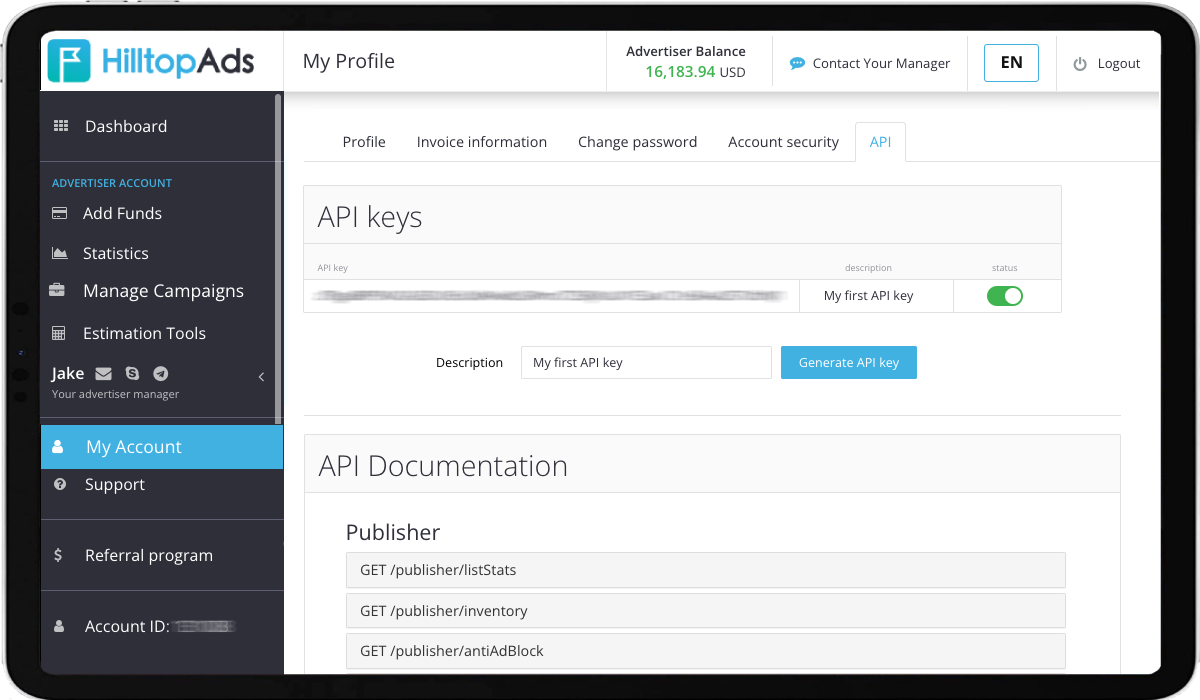
To access the API, users typically need to generate an API key. Once authenticated, advertisers and publishers can send HTTP requests and receive responses in formats such as JSON. This allows them to retrieve statistics, manage campaigns, update settings, and automate routine tasks without relying on the platform interface.
Benefits of Using an Ad Network API
Using an ad network API can help simplify campaign management and improve operational efficiency in several ways:
More Efficient Campaign Management
API access allows users to create, manage, and update campaigns programmatically. Tasks such as adjusting bids, updating targeting settings, or managing traffic sources can be automated, reducing the need for manual work.
Better Reporting and Performance Monitoring
APIs provide access to campaign statistics and performance data, making it easier to monitor results and build custom reporting workflows. This helps advertisers make faster, data-driven decisions.
Time Savings Through Automation
Many routine actions can be automated through API integrations, allowing teams to spend less time on repetitive tasks and focus more on optimisation and strategy.
Greater Flexibility
API integrations make it possible to connect advertising platforms with internal tools, dashboards, analytics systems, and other third-party solutions. This gives advertisers more control over how they manage and analyse their campaigns.
How to Choose an Ad Network with API Access
When choosing an advertising network with API access, it is worth considering several factors:
Functionality
Not all APIs offer the same features. Some provide basic reporting, while others allow users to manage campaigns, update bids, work with blacklists and whitelists, or automate routine tasks. Make sure the available functionality matches your business needs.
Documentation and Support
Clear documentation can significantly reduce integration time and help developers get started faster. It is also important to have access to responsive support if technical issues arise.
Ease of Integration
APIs vary in complexity. Look for solutions that are well-documented, easy to implement, and compatible with your existing tools and workflows.
Pricing and Access Conditions
Some platforms may limit API access to certain account types or usage levels. Before integrating, check whether there are any additional requirements, restrictions, or costs associated with API usage.
Security
API integrations often involve access to campaign data and account settings. Choose a platform that follows security best practices and provides secure authentication and data protection measures.
HilltopAds API Features for Advertisers and Publishers
Our network has developed a large list of APIs for our customers to simplify their work.
For publishers they are:
- Statistics.
- Inventory. Returns a list of publisher’s sites and zones.
- Anti-ad block. Returns invocation code for specified zone or subId. To prevent ad blocking, this method may return a slightly different code each time, so it is recommended to get a new code every 5 minutes. This code differs from the code you get from a web interface and performs better if you recache it frequently.
- Balance.
For advertisers they are:
- Statistics.
- Start campaign. Turns campaign status to “on”. Please, keep in mind that traffic will start only after the campaign is approved by the moderator. The current approval state will be indicated in the response.
- Stop campaign. Turns campaign status to “off”. This will stop traffic, but some inertia (up to 10 minutes) may take place.
- Archive campaign.
- Unarchive campaign.
- Add to Blacklist/Set Blacklist. Stops getting traffic from specified sources. Please, keep in mind that some inertia (up to 1 hour) may occur.
- Remove from Blacklist. Resume getting traffic from specified source if it was previously blacklisted. This action just cancels source blacklisting. Please, keep in mind that some inertia (up to 1 hour) may occur.
- Clear campaign Blacklist.
- Add to Whitelist/Set Whitelist. Starts getting traffic from a specified source. Please, keep in mind that some inertia (up to 1 hour) may occur.
- Remove from Whitelist. Stops getting traffic from a specified source if it was previously whitelisted. This action just cancels source whitelisting. Please, keep in mind that some inertia (up to 1 hour) may occur.
- Clear campaign Whitelist.
- Set bid. Set up the price of action for a campaign of CPA type, price of click for a campaign of CPC type, or price of 1000 impressions for a campaign of CPM type.
- Set destination URL. Changes final destination URL for traffic. Please, keep in mind that this action may require moderation. During the moderation process, traffic will be sent to the previous destination URL.
- Replace domain.
- Inventory. Returns a list of advertisers’ campaigns and ads.
- Campaign Blacklist. The list of zones added to the blacklist.
- Campaign Whitelist. The list of zones added to the whitelist.
- Balance.
Overall, ad network APIs can help advertisers measure campaign performance, optimise ad management, and simplify routine work. APIs offer a range of benefits, from streamlined campaign management to enhanced performance tracking and reporting. By providing programmatic access to an ad network’s platform, they allow advertisers and publishers to improve the efficiency of their advertising workflows.
With the right API in place, advertisers and publishers can achieve greater flexibility and customization in how they manage, analyse, and optimise their campaigns.
In case of any questions, you can always contact your account manager for API assistance. Our support team will help you set up HilltopAds APIs and use the available features more effectively.