


Poor tracking kills profitability and limits scale. This guide explains how to connect Binom with HilltopAds for accurate postback tracking and smarter optimization. Learn the exact setup steps to analyze traffic, cut waste, and grow ROI faster.

Accurate tracking is the backbone of profitable media buying. Whether you’re running iGaming, dating, eCommerce, mobile apps, or subscription-based offers, understanding where your traffic converts and why is what separates scalable campaigns from wasted budgets.
In this guide, we’ll walk through how to integrate Binom with HilltopAds, set up postback tracking correctly, and prepare your campaigns for optimization and scale.

Sign up with HilltopAds as an advertiser and get
access to high-quality direct traffic, accurate tracking, and tools designed to scale profitable campaigns faster.
Why Use Binom for Tracking?
Binom is one of the leading tracking platforms for affiliates and media buyers. Its key advantage lies in full data ownership.
Unlike most cloud-based trackers where your data is stored on third-party servers, Binom allows you to run the tracker on your own server. This gives you better security and full control over your data.
When combined with HilltopAds, one of the best direct traffic advertising networks, Binom becomes a powerful tool for analyzing traffic quality, optimizing campaigns, and improving ROI.
Also read our selection of the 9 best iGaming marketing agencies:

What You’ll Need Before You Start
Before setting up the integration, make sure you have:
- An active Binom account, you can start from here
- A HilltopAds advertiser account
- An offer (affiliate or direct)
- Optional: a pre-landing page for testing or funnel optimization
Once that’s ready, you can proceed with the setup.
Step 1: Add HilltopAds as a Traffic Source in Binom
- Log in to your Binom dashboard
- Go to Traffic Sources in the top menu
- Click Create
- Select Load from template
- Find and choose HilltopAds
Binom will automatically preload the main settings for HilltopAds.
Adding Placeholders (Optional but Recommended)
If you want deeper statistics, you can add additional parameters (placeholders): specify the parameter name and assign the corresponding placeholder as listed in HilltopAds
The full list of available HilltopAds placeholders can be found in our Help Center or at the end of the article.
Add the placeholders you need in Binom and save the traffic source.
Step 2 (Optional): Add a Landing or Pre-Landing Page
Whether you are using a pre-lander or running A/B tests, we would recommend adding a lander. In Binom account:
- Go to Landers
- Click Create
- Enter a name
- Paste your landing page URL
- Adjust parameters if needed
- Click Save
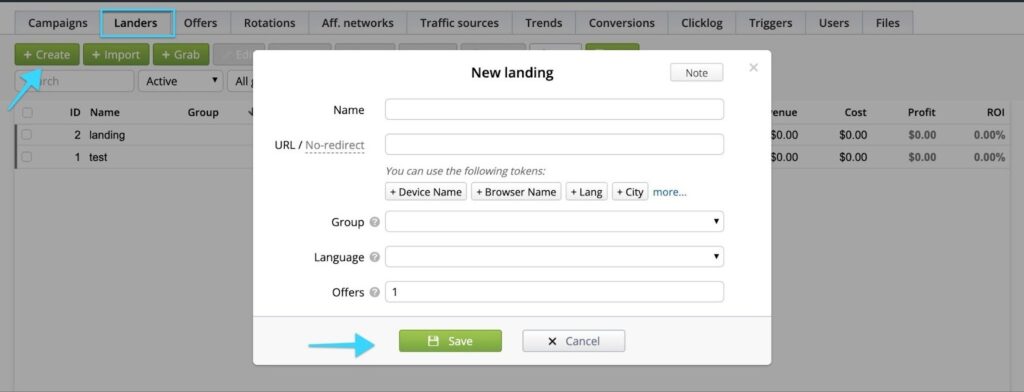
If you don’t use pre-landers, you can skip this step and run traffic directly to the offer.
Tip: At HilltopAds, we consistently advise advertisers and affiliates to use pre-landing pages whenever possible. Pre-landers help warm up the audience, set the right expectations, and clearly explain to users what action they should take next. As a result, traffic arrives at the offer more prepared which typically leads to a higher conversion rate and better overall campaign performance.
Step 3: Add an Offer in Binom
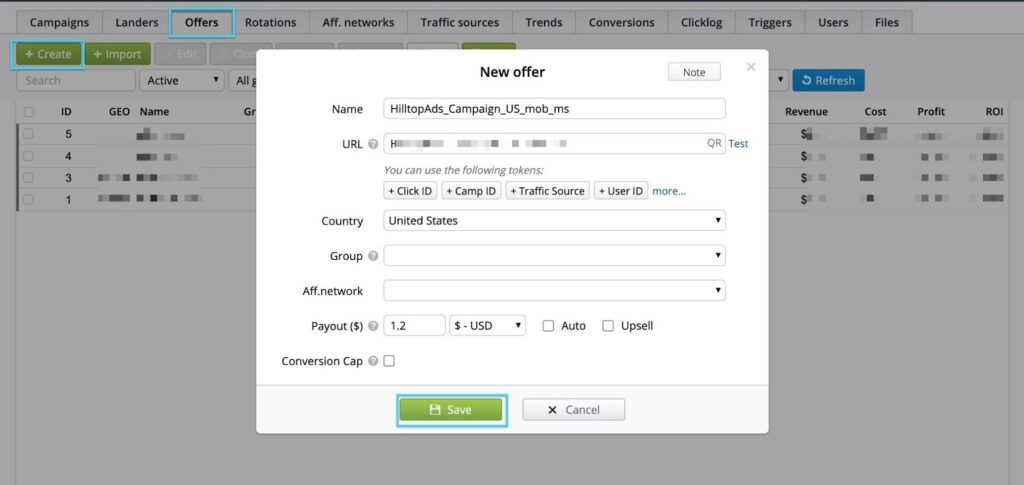
Next, you need to add the offer you’ll be promoting via HilltopAds.
- Go to Offers
- Click Create
- Enter the offer name
- Paste the offer URL
If You Work With an Affiliate or CPA Network
Before adding the offer:
- Go to Affiliate Networks
- Click Create
- Select Load from catalog
- Choose your affiliate network from the list, follow the instruction on the screen
Then return to Offers, select the affiliate network you created, enter the offer details, and save.
If You’re a Direct Advertiser
- Paste your offer URL
- Add Click ID tokens
- Specify payout (you can use Auto)
- Save the offer
Sign up as a HilltopAds advertiser today and combine it with Binom to track
every click, optimize campaigns with precision, and turn your traffic into measurable, scalable profits.
Step 4: Create a Campaign in Binom
Now it’s time to bring everything together.
- Go to Campaigns
- Click Create
- Set a campaign name
- Select HilltopAds as the traffic source
- Choose a payment model (e.g. CPM, Auto)
- Configure additional settings if needed
Path Setup
- Select your lander (if used)
- Or choose Direct if no pre-landing page
- Select the offer you created earlier
You can also configure rules for optimization at this stage.
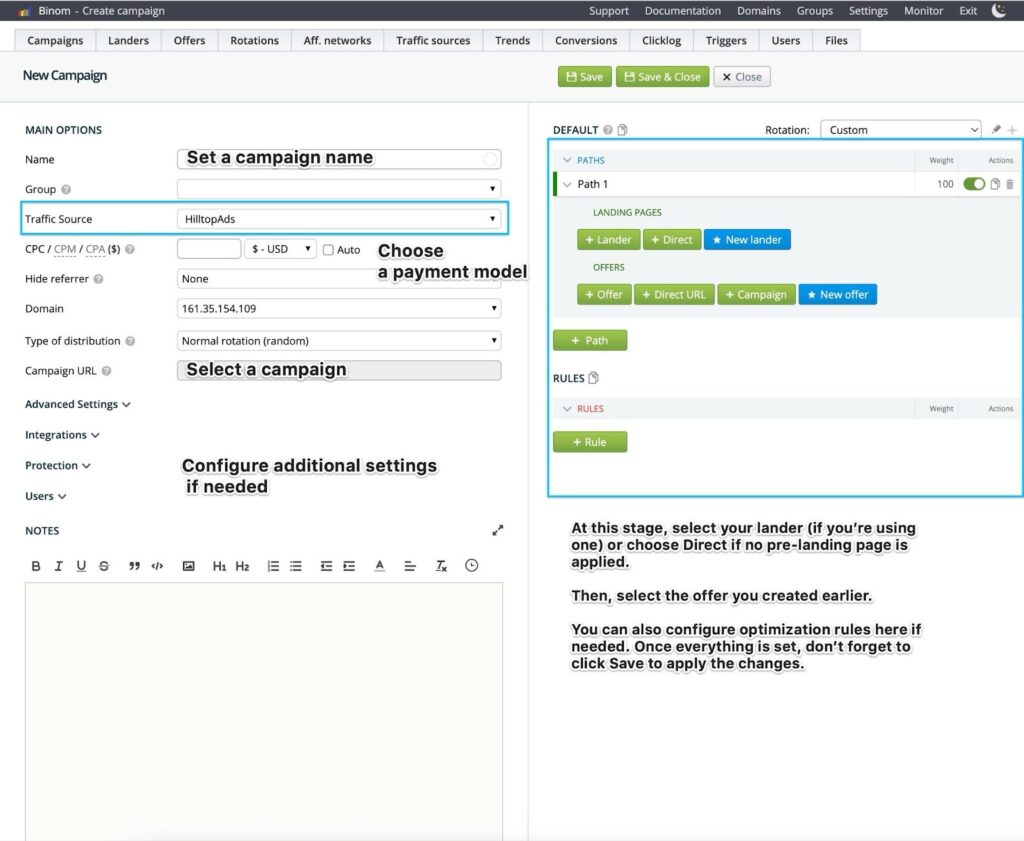
Once saved, Binom will generate your campaign URL and postback URL.Copy the campaign URL, you’ll need it for HilltopAds.
Step 5: Create a Campaign in HilltopAds
- Log in to your HilltopAds advertiser account
- Go to Manage Campaigns
- Click Add Campaign
- Review HilltopAds’ ad policies
- Choose the Net format (traffic channel)
- Set your campaign name
- Paste the Binom campaign URL as the Final Destination URL
After that, configure targeting, set limits, and enable additional rules is needed. Kindly refer to our full guide on campaign creation in our Help Center → Create ad campaigns.
Click Add Campaign, make a deposit, and launch.
Your Binom ↔ HilltopAds postback integration is now complete.
We recommend checking out our 2026 events calendar to help you maximize your earnings:

Final Thoughts
Proper tracking is not optional, it’s essential. The Binom + HilltopAds integration allows you to measure, analyze, and optimize every step of your traffic funnel with precision.
Whether you’re working with iGaming, dating, adult, eCommerce, mobile apps, VPNs, or subscription offers, this setup helps you turn raw traffic into actionable insights and profit.
If you haven’t tested HilltopAds yet, now is a great time to start especially when paired with a powerful tracker like Binom.
Happy optimizing!