


eCommerce traffic is easy to buy but hard to convert into real sales without the right setup. This guide shows how to build profitable eCommerce campaigns in HilltopAds with tested settings and proven strategies. Inside, you’ll find key configurations and optimization tips to scale with consistent ROI.
Shopping is now mobile-first. More than half of global eCommerce sales originate from smartphones, with billions of users browsing and purchasing through mobile apps each week.
Consumer behaviour has shifted. Purchases are now often driven by discovery, convenience, and impulse rather than solely by intent. More than half of shoppers browse while shopping, and factors such as reviews, user experience, and fast delivery directly influence their decisions.
In this environment, paid traffic is one of the most effective ways to reach users when they are ready to explore and make purchases.

Promote your eCommerce campaigns with HilltopAds
and get access to over 273 billion impressions per month across 250+ countries.
Why Use HilltopAds for eCommerce Offers?
HilltopAds is one of the best ad networks that is well-suited for eCommerce campaigns, offering the essential tools to convert traffic into sales. Our large mobile traffic volumes help advertisers reach users in high-intent, impulse-driven settings where quick purchase decisions are common.
Flexible pricing models such as CPM and CPA Goal support broad testing and seamless scaling as effective funnels are identified. Built-in auto-optimization tools improve management of delayed conversions by filtering underperforming traffic and prioritizing high-converting zones.
With global GEO coverage and precise targeting, HilltopAds enables eCommerce advertisers to test multiple markets, optimize campaigns efficiently, and scale profitably without added complexity.
Check out our recent interview with the COO of LosPollos on the latest affiliate marketing trends:

How to start working with HilltopAds?
Before launching your eCommerce campaign, ensure your account is set up to run ads. This process is quick and straightforward. If you already have an active HilltopAds account, you can move to the next step.
Instructions for New Advertisers
If you are new to HilltopAds, please follow these steps to get started:
Create and verify your account
Sign up as an advertiser and complete verification to access all platform features.
Enter your invoice details
Add your billing information to ensure smooth payments and proper account setup.
Add funds to your account balance
Make your first deposit to begin launching campaigns.
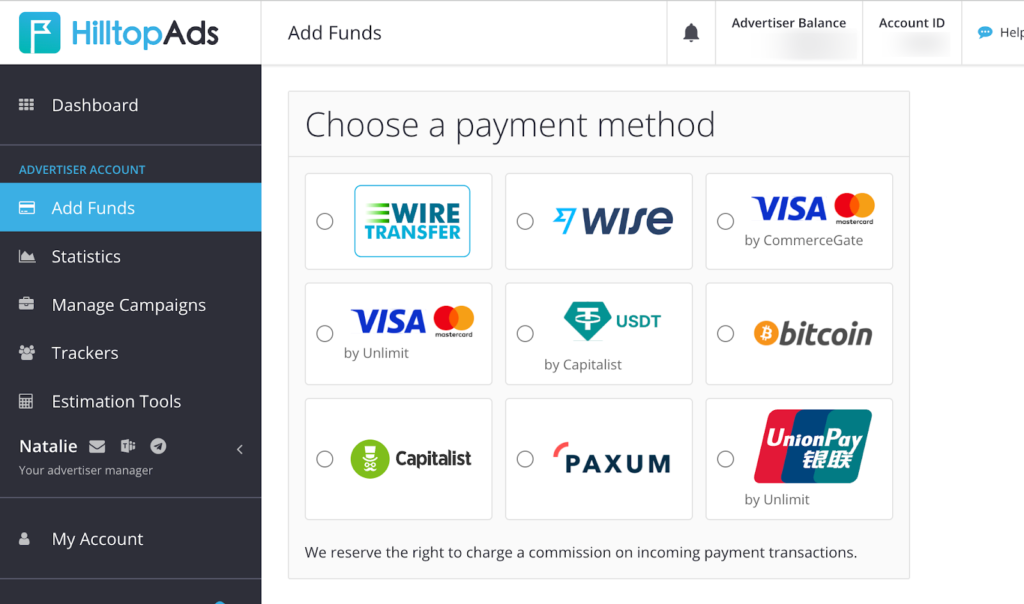
After completing these steps, you are ready to create and run your first eCommerce campaign.
Want a bonus to your first time deposit? Follow us on social media for access to exclusive promo codes.👉 Linkedin, Facebook, Instagram, Telegram, YouTube

Start advertising with HilltopAds today and get
- Advanced targeting options
- Direct traffic sources
- Self-serve platform
- Fully-managed service
- Postback tracking
How to Set Up an eCommerce Campaign in HilltopAds?
The following setup is based on recommendations from HilltopAds account managers and is tailored for eCommerce campaigns. HilltopAds works with all major eCommerce platforms, including TikTok Shop, Shopee, Lazada, Tokopedia, etc. I recommend staying in contact with your personal manager for updates on rates, trending offers, and tips to help you launch and scale efficiently.
Follow these steps to launch, test, and scale your campaigns effectively.
Key Points
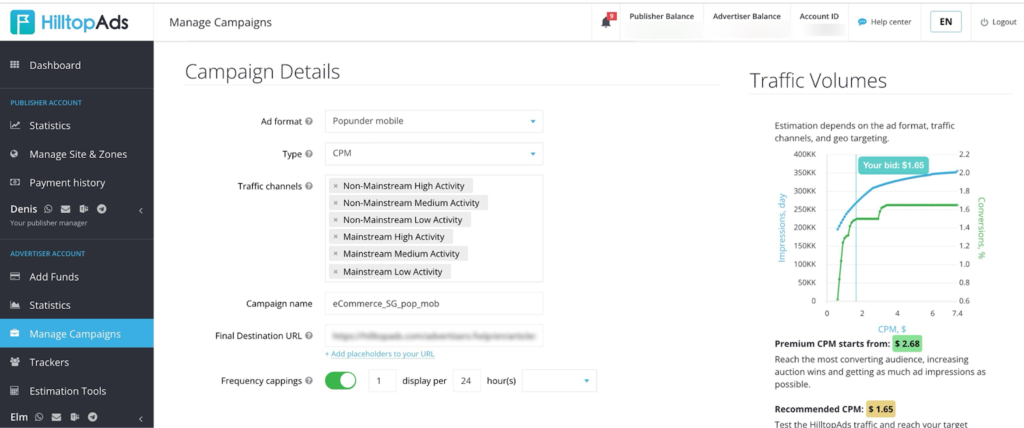
- Top format: Popunder (mobile)
- Pricing models: CPM, CPC, CPA Goal*, CPA* (available if you use postback)
- Traffic: All traffic
- Frequency cap:
- 1/24 (balanced approach)
- or 1/6 (more aggressive retargeting)
- Daily budget:
- $300–500 per GEO (recommended)
- minimum $200 per GEO for testing
- Auto-optimization: essential
- Conversion delay: must be considered before optimization
Ad Format & Pricing Model
Popunder Mobile (Recommended)
Popunder remains the most stable and scalable format for eCommerce campaigns. It delivers high traffic volumes and is especially effective for:
- impulse purchases
- discount-driven offers
- dropshipping funnels
Pricing Models
Start withCPM / CPC when you’re testing new campaigns.
Once you’re ready to optimize and scale, switch to CPA Goal or CPA.
Pro tip: When using CPA Goal, set a Max CPM bid to control costs.
Traffic Settings
Traffic type: All traffic
WebView: enabled by default (recommended)
Proxy traffic:
- launch in a separate campaign
- especially relevant for multi-GEO offers
Frequency Cap Strategy
There are two primary options for setting your frequency cap:
- 1/24 (1 impression per 24 hours)
This option is safer and helps prevent ad fatigue. - 1/6 (1 impression per 6 hours)
This option is more aggressive and better for repeated exposure.
eCommerce often requires multiple touches before conversion, so testing both options is recommended.
Technical Targeting
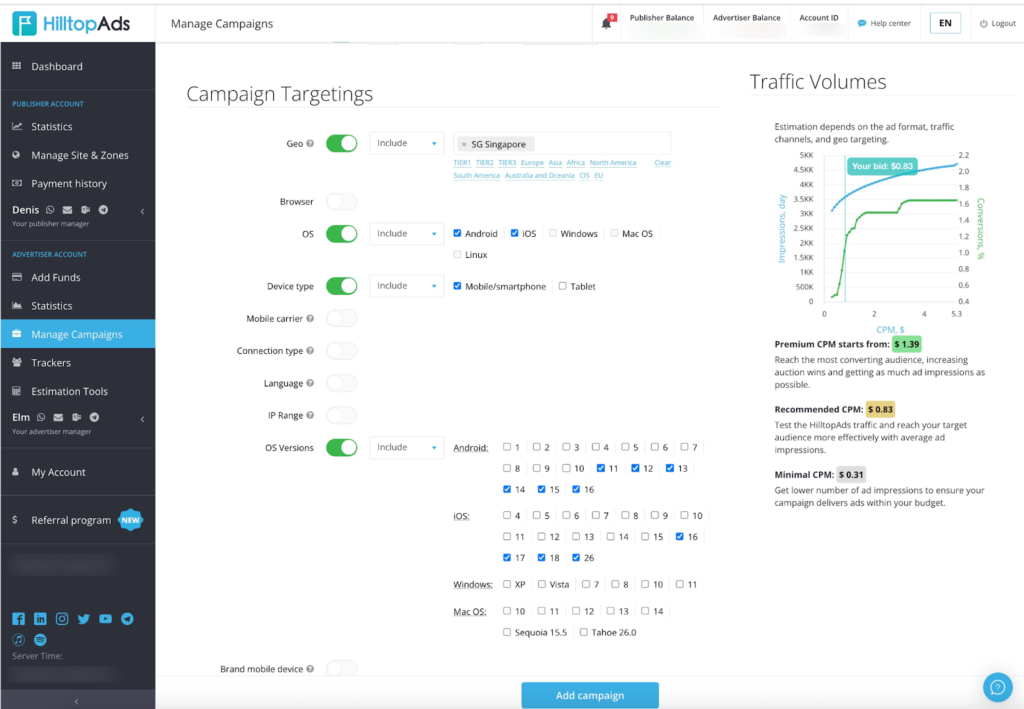
Devices: Mobile / Smartphones only
Operating Systems: iOS 16+, Android 11+
The Best GEOs to Start With
KR, FR, DE, JP, AU, ES, ID, GB, IT, MX, CA, SG, PH, TW
Language Targeting
- Use language targeting only if your landing page does not automatically adapt to the user’s language.
- If your landing page adapts automatically, maintain broad targeting to enable faster scaling.
Launch your campaigns with HilltopAds
at competitive CPM rates and maximize your ROI.
Read our article about high-quality affiliate traffic:

Auto-Optimization Rules (Must-Have)
eCommerce campaigns require a distinct optimization approach as conversions often occur with a delay.
Key principle: You must know your average time to conversion. Without this, optimization decisions will be inaccurate.
Recommended Setup:
I recommend optimizing based on eCPA. Always set a Max CPM when you’re running CPA Goal campaigns.
Do not rush optimization. Wait until you have:
- collected sufficient data
- allowed the conversion window to pass
This allows you to scale high-performing zones faster and automatically cut underperforming traffic.
Budget & Testing Strategy
Your budget directly impacts the quality of your testing.
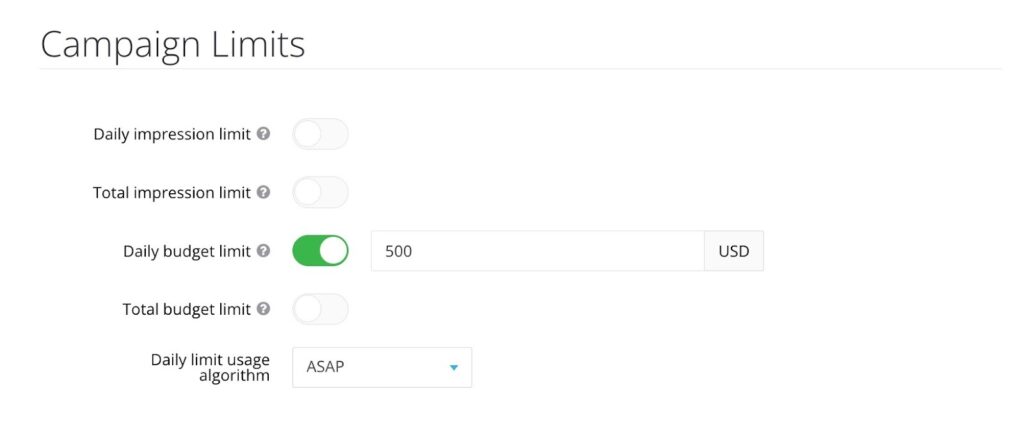
- Recommended: $300–500 per GEO per day
- Minimum: $200 per GEO
This ensures sufficient data collection and more accurate optimization decisions.
Low budgets often result in inaccurate conclusions and missed opportunities.
Additional Setup Notes
- There is no need to set a campaign schedule; run campaigns continuously.
- Split campaigns by GEO & traffic type (proxy vs non-proxy)
- Consistently test multiple funnels and landing pages
Check out our successful case studies on running eCommerce campaigns with HilltopAds:


Final Thought
eCommerce campaigns require time to deliver results. Success relies on precise setup, adequate budgets, and thoughtful optimization.
Supplying robust data and leveraging auto-optimization tools allows you to identify and efficiently scale profitable areas.
If you want a reliable way to drive sales and grow your eCommerce business, HilltopAds is a strong starting point. Launch your first campaign, follow the setup guide, and expand on successful strategies. Your dedicated manager is available to provide support whenever needed.
Create your account today to begin testing your first eCommerce campaign with HilltopAds.