


Clicks won’t grow your Telegram channel if users never subscribe or start your bot. Discover the HilltopAds campaign settings that turn ad traffic into real users without wasting your budget.

If you want to grow your Telegram channel or get more users for your bot, this guide will help you get started. We’ll cover the recommended campaign settings from our advertising managers, including targeting, bidding, budgets, and auto-optimization rules.
Promoting a Telegram channel or bot can seem straightforward: choose your audience, share your Telegram link, and wait for results. But bringing in traffic is only the first step. The main goal is to reach users who open Telegram and take the action you want.
This is why campaign setup is important. Device type, operating system, browser, traffic quality, and how users access Telegram – everything influences your results.
We gathered recommendations from HilltopAds advertising managers to create a practical starting point for your Telegram campaign. You can use these settings to launch your first campaign and adjust as you see results.
Grow your Telegram channel or bot with HilltopAds
sign up to launch targeted campaigns with quality traffic and auto-optimization tools.
Why Use HilltopAds to Promote Telegram Channels and Bots?
Telegram promotion is applicable to a wide range of products, from news and entertainment channels to gaming communities, educational projects, subscription services, and automated bots.
HilltopAds provides you with the opportunity to test different audiences with mobile Popunder traffic, flexible targeting, CPM, CPA Goal bidding, and auto-optimization tools.
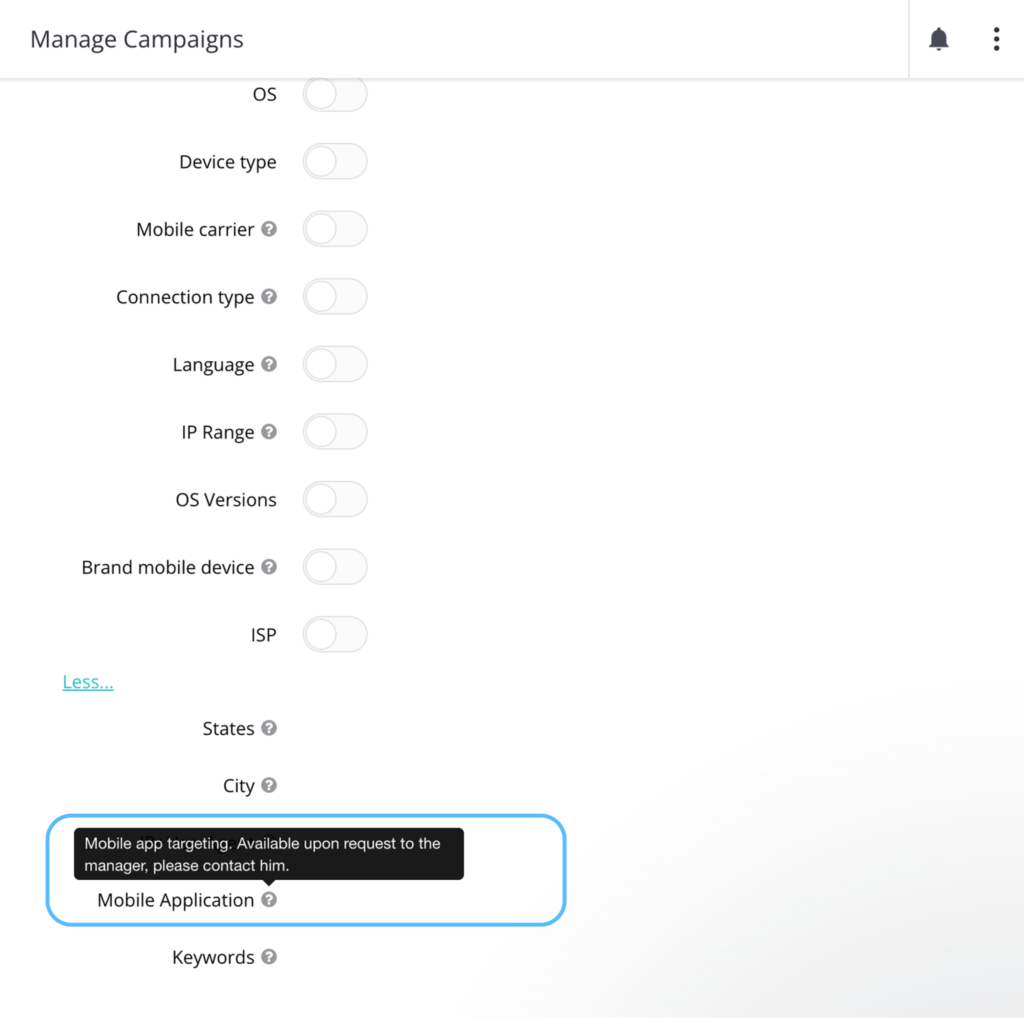
You can also target Telegram-specific traffic to test audiences who are already connected to Telegram, separate from broader sources. To access this traffic segment, you need to contact your personal manager, they will manually activate the setting in the backend for you.
This gives you two distinct approaches:
- Telegram-targeted campaigns: Focus on Telegram-related traffic and test whether it generates subscriptions or bot starts more efficiently.
- Broad campaigns: Reach wider audiences and identify users who are interested in your Telegram product, even if they aren’t coming from Telegram-specific traffic.
We recommend testing these approaches in separate campaigns. This way, you can compare costs and optimize each one based on performance.
Check out our article on how to build a multi-channel advertising strategy without wasting your budget.

How to Set Up a Telegram Promotion Campaign in HilltopAds
Let’s start with the core settings.
주요 내용
- Mobile popunder is the recommended starting format for Telegram channels and bots.
- Set up separate campaigns for Android and iOS to compare the results and manage your budget.
- Start with the High and Medium Activity traffic channels. Test the Low traffic separately only after you get your initial results.
- Choose CPM or CPA goal depending on whether you have conversion tracking in place.
- Test Telegram-specific targeting and broad traffic in separate campaigns.
- Use the auto-optimisation rules to pause spend on zones that aren’t bringing conversions.
Recommended Campaign Preset
| 설정 | Recommendation |
| 광고 형식 | 모바일 Popunder |
| Bidding model | CPM / CPA 목표 |
| 트래픽 채널 | 높음 + 중간 |
| Additional traffic test | 낮음 |
| 장치 유형 | Mobile / Tablet, separately |
| Opera팅 시스템 | Android / iOS, separately |
| Frequency cap | 1/24 initially; test 1/12 |
| Browser targeting | 넓게 시작해 |
| 언어 | Match your Telegram product and GEO |
| Proxy / WebView | Test separately |
| 일일 예산 | $50–150 per GEO |
| 총 테스트 예산 | $300–400 per GEO |
| 자동 최적화 | Stop zones spending 2–2.5× target CPA without conversions |
These settings are a starting point. The best setup depends on your GEO, audience, offer, and target cost.
Step 1. Choose the Right Ad Format
모바일 Popunder
All HilltopAds managers recommend using mobile Popunder as the main format for Telegram promotion.
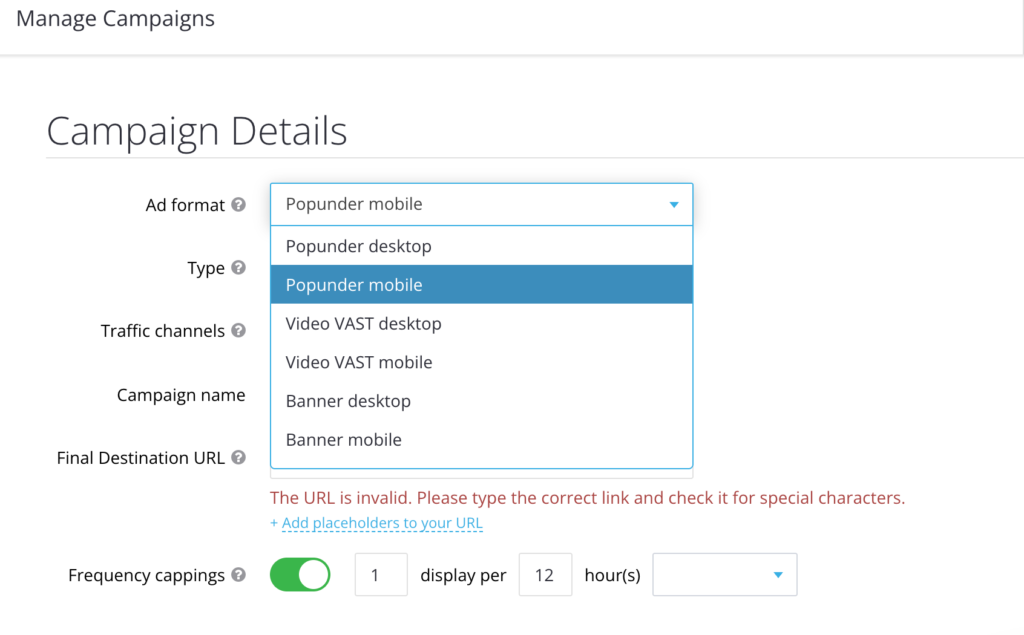
Based on Telegram’s design and usage patterns, Telegram traffic is mostly mobile-driven. So, you don’t need display creatives; send users straight to your product. Your destination URL in that case would be a direct Telegram link (https://t.me/yourchannel or https://t.me/yourbot)
We recommend starting with direct Telegram links. Check that users can reach your channel or bot from the browsers and operating systems you plan to target.
Step 2. Choose Your Bidding Model
For Telegram promotion you can choose between CPM and CPM Goal.
CPM
With CPM you pay for traffic volume (for every thousand impressions, to be precise). To control performance, you can manage bids, targeting and auto-optimization rules.
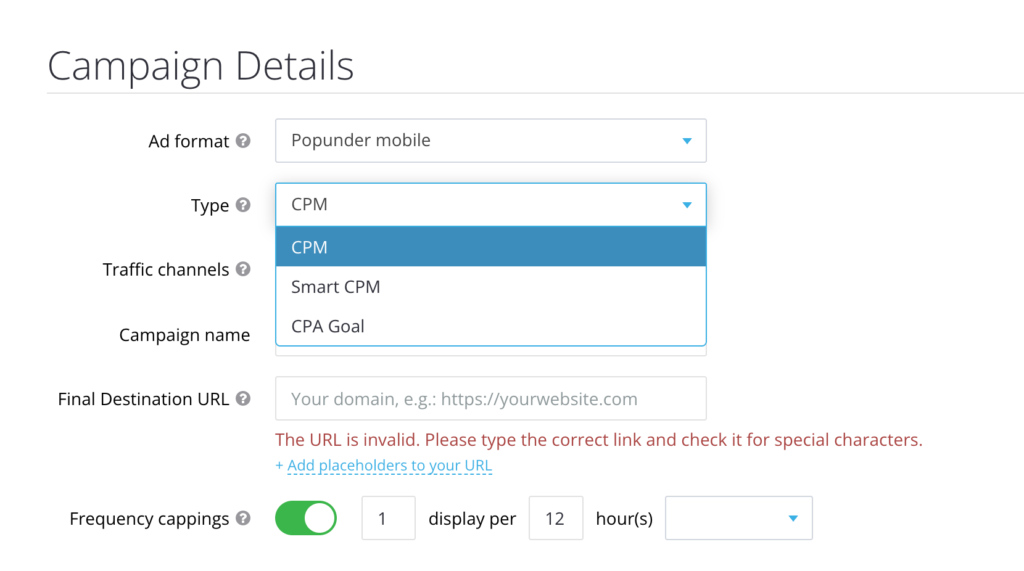
CPM is a good starting point if you are testing GEOs and audiences or do not have conversion tracking set up yet. For broad traffic, start with the minimal rates for your GEO. Adjust bids as you see performance data.
CPA 목표
If you have conversion tracking set up with Postback, you can also use CPA Goal. It allows you to optimize around your target action.
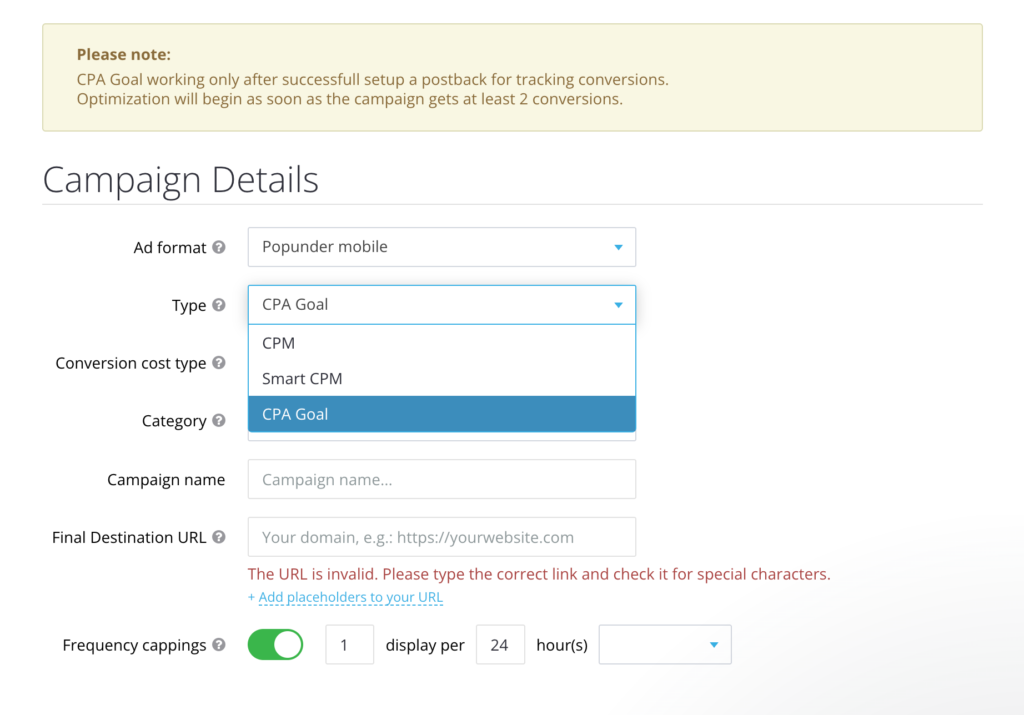
CPA Goal works best when your goal is measurable, like getting a new subscriber or a bot start.
Define what counts as a conversion, and make sure this event is tracked correctly in HilltopAds. Are you not using any tracker yet? We have detailed guides on connecting the most popular ones to HilltopAds. Check out the guides (promocodes inside)!

Tip: A click on a Telegram link is not the same as a completed subscription or bot start. Your tracking should tell these actions apart if you want to optimize for real user acquisition.
다음에 등록하세요. 광고주에게 최고의 광고 네트워크 HilltopAds
Step 3. Choose GEOs and Telegram Traffic Targeting
Your choice of target GEO depends on whether you are focusing on a Telegram-specific audience or running a larger-scale campaign.
Option A: Telegram-Specific Traffic
For Telegram campaigns, consider a broad range of geographic regions, as long as the audience aligns with your product.
Please contact your manager to get access to the feature.
Option B: Broad Traffic
For broad campaigns, start with markets where Telegram is popular and your product is in demand.
Consider the following regions for testing:
– CIS countries;
– India;
– other geographic regions where your Telegram channel or bot has an appropriate audience.
If your channel targets a specific language, focus on countries where that language is spoken and where your target audience can engage with your content.
Compare Both Approaches
Do not mix all traffic in one campaign. Set up two separate tests:
| 캠페인 | 타겟팅 | What to measure |
| Campaign A | Telegram-specific traffic | Cost per subscriber / bot start |
| Campaign B | Broad traffic | Cost per subscriber / bot start |
This comparison helps you see if higher costs for Telegram-related traffic lead to better acquisition results.
TrafficStars의 대체 서비스에 관한 당사의 기사를 확인해 보세요:

Step 4. Technical Targeting
Configuring technical parameters is essential if we want users to open your product in a mobile app.
Devices & OS:
Start with mobile traffic and run Android and iOS versions separately.
Splitting by operating system helps you see differences in traffic costs, app-opening behavior, and conversion rates.
Later, once your first data for optimization, you can check OS versions. For a focused test, you can also target the latest two or three OS versions separately.
브라우저
There are two main approaches to browser targeting.
Focused browser targeting:
- Android: Chrome
- iOS: Safari, Chrome, Google Search App
Broad browser targeting:
- All browsers, with performance analyzed after collecting initial data
While focusing on specific browsers gives you more control at first, broader browser targeting can help you discover new converting opportunities.
언어 타겟팅
Remember to match your target language with the language of your Telegram product.
예를 들어
| GEO | Suggested language |
| Italy | Italian |
| 스페인 | 스페인어 |
| 독일 | German |
| 프랑스 | 프랑스어 |
| 폴란드 | Polish |
If your channel or bot is multilingual, test each language separately if you can.
Proxy and WebView Traffic
There are different ways to handle Proxy and WebView traffic.
Some recommend turning off Proxy and WebView traffic for your first test. Others suggest keeping them on to see if they bring extra results.
The best way is to test Proxy and WebView traffic separately so you can compare results.
- Mobile connection
- Broadband / Wi-Fi connection
This helps you see if connection type affects Telegram opens and conversions.
Step 5. Frequency Capping
This setting limits how often a unique user sees your ads. We recommend starting with the standard 1/24 – which means 1 impression per user every 24 hours.
After you have enough data, try a frequency cap of 1/12 and compare your conversion costs.
Do not assume that showing ads more often will always bring more subscribers. Check if the extra spend leads to more completed actions.
Step 6. Define Your Testing Budget
Your recommended budget depends on how many GEOs you test, your targeting, and the size of your test. Our managers suggest the following ranges:
| Budget parameter | Recommendation |
| Minimum daily budget | $50 per GEO |
| Typical daily budget | $100 per GEO |
| Higher daily test budget | $100–150 per GEO |
| 총 테스트 예산 | $300–400 per GEO |
For example, if you test one GEO with Android and iOS in separate campaigns, split your budget between them instead of giving each the full amount.
If you test several GEOs at once, plan your total spend to cover all of them.
Remember, your test budget is for collecting enough data to judge traffic quality and acquisition costs. It does not guarantee a set number of subscribers or bot starts.
Step 7. Configure Auto-Optimization Rules
Auto-optimization helps you avoid extra spending by finding zones that do not bring results.
For Telegram promotion, use an eCPA-based rule.
Recommended Auto Rule
Condition:
- Zone spends your target CPA x2,5
- Conversions <1
Action:
- add the zone to blacklist
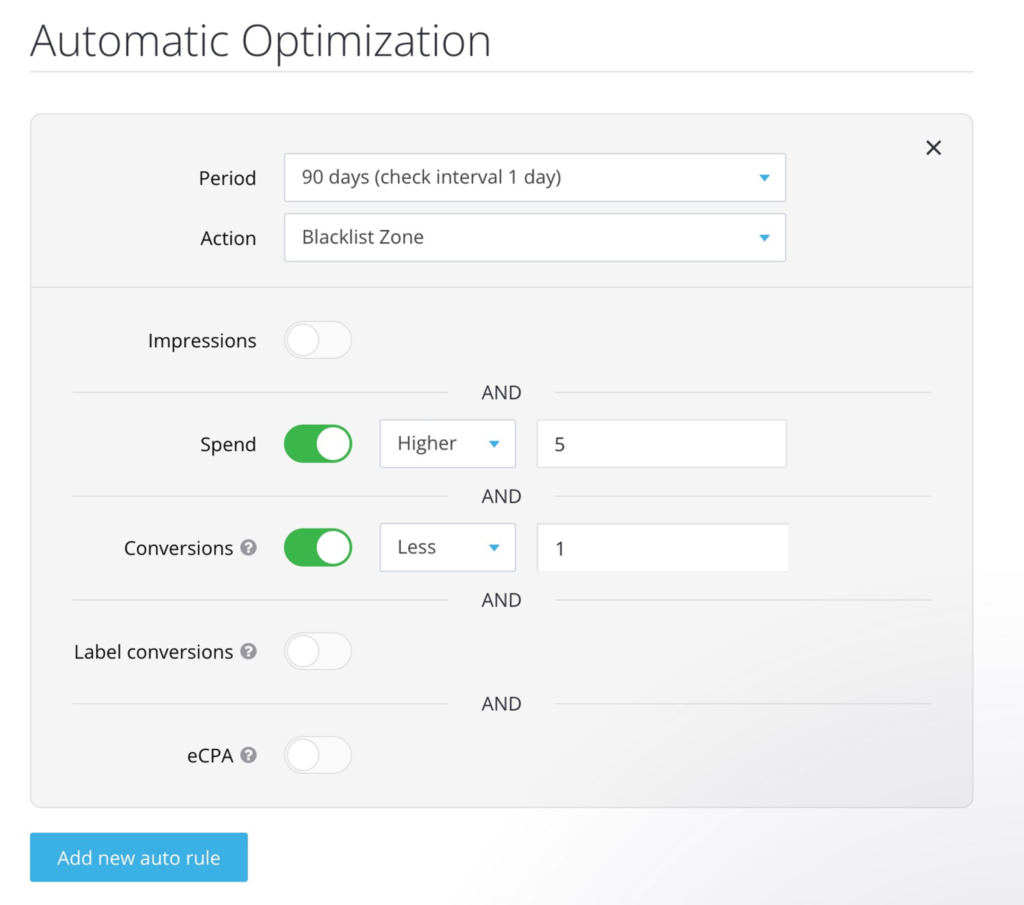
For example if you plan to pay $2 per bot start, you can turn off a zone after it’s spent 4-5 with no conversion. That’s your starting threshold; you’ll obviously need to adjust it based on your conversion volume and the reliability of your tracking.
Keep in mind: Not every user acts right after seeing an ad. Some users may open Telegram and subscribe later, or your conversion may be tracked with a delay. Before using strict auto-rules, make sure your evaluation window gives time for delayed conversions. Otherwise, you might turn off zones that could still bring conversions.
Step 8. Track the Right Conversions
This is a key difference between Telegram promotion and standard website campaigns.
For a Telegram channel, your desired action might be:
- A new channel subscriber
- A qualified subscriber who remains active
For a Telegram bot, you might track:
- A user starting the bot
- A completed onboarding step
- Another meaningful in-bot action
A direct Telegram link does not automatically send subscription or bot-start data to HilltopAds.
You need to set up a tracker that links a Telegram action to an ad click and forwards the conversion data back via a postback. If this is not feasible (meaning you cannot track actual subscriptions or every bot start), you will have to use a CPM model and analyze engagement and audience acquisition metrics instead. Just be sure not to count link clicks as conversions.

HilltopAds에 등록하고
- 고급 타겟팅 옵션
- 직접 트래픽 소스
- 셀프 서비스 플랫폼
- 완전 관리형 서비스
- Postback 추적
- 직접 트래픽 소스
Bonus Tip: Test Telegram Targeting Against Broad Traffic
One of our managers’ most useful recommendations is to run two separate campaigns with different traffic strategies.
Campaign A: Telegram-targeted traffic
- 모바일 Popunder
- Telegram-specific targeting (contact your personal manager to enable the mobile application targeting)
- Android and iOS separately
- Higher bids where justified
- Frequency cap 1/24
Campaign B: Broad traffic
- 모바일 Popunder
- No Telegram-specific targeting
- GEOs relevant to your audience
- Start with minimum available GEO rates
- Frequency cap 1/24
Use the same final destination URL and conversion event for both campaigns. Compare the results based on the same metric (cost per confirmed subscription or bot start).
Final Checklist: Your Telegram Campaign Preset
Before launching, make sure you’ve configured the following:
| Parameter | Starting setup |
| 형식 | 모바일 Popunder |
| Bidding | CPM; CPA Goal with tracking |
| 트래픽 | 높음 + 중간 |
| Telegram targeting | Separate test against broad traffic |
| OS | Android / iOS separately |
| 기기 | Mobile; tablets separately |
| 브라우저 | Focused or broad test |
| 언어 | Matches the product |
| Proxy / WebView | Separate tests |
| Frequency cap | 1/24 |
| 일일 예산 | $50–150 per GEO |
| Test budget | $300–400 per GEO |
| Auto-rules | 2–2.5× target CPA, zero conversions |
| Destination | Direct Telegram channel or bot link |
| KPI | Cost per confirmed subscriber / bot start |
We also recommend checking out our advertisers’ success stories:

Is HilltopAds a Good Choice for Telegram Promotion?
If you want to attract new subscribers to your Telegram channel or get more users for your bot, HilltopAds gives you several ways to test and optimize your strategy.
Start with a strategic test, measure real user actions wherever you can and only scale the combinations that give you a decent acquisition cost.
How to start you Telegram ad campaign with Hilltopads?
1. Go to the Hilltopads sign-up page and select “Advertiser” as your role. Enter your name, email, password, and a contact messenger like Telegram or WhatsApp (you will need it for further contact with your personal manager: only real help from a human, no spam or bot answers, I swear!)
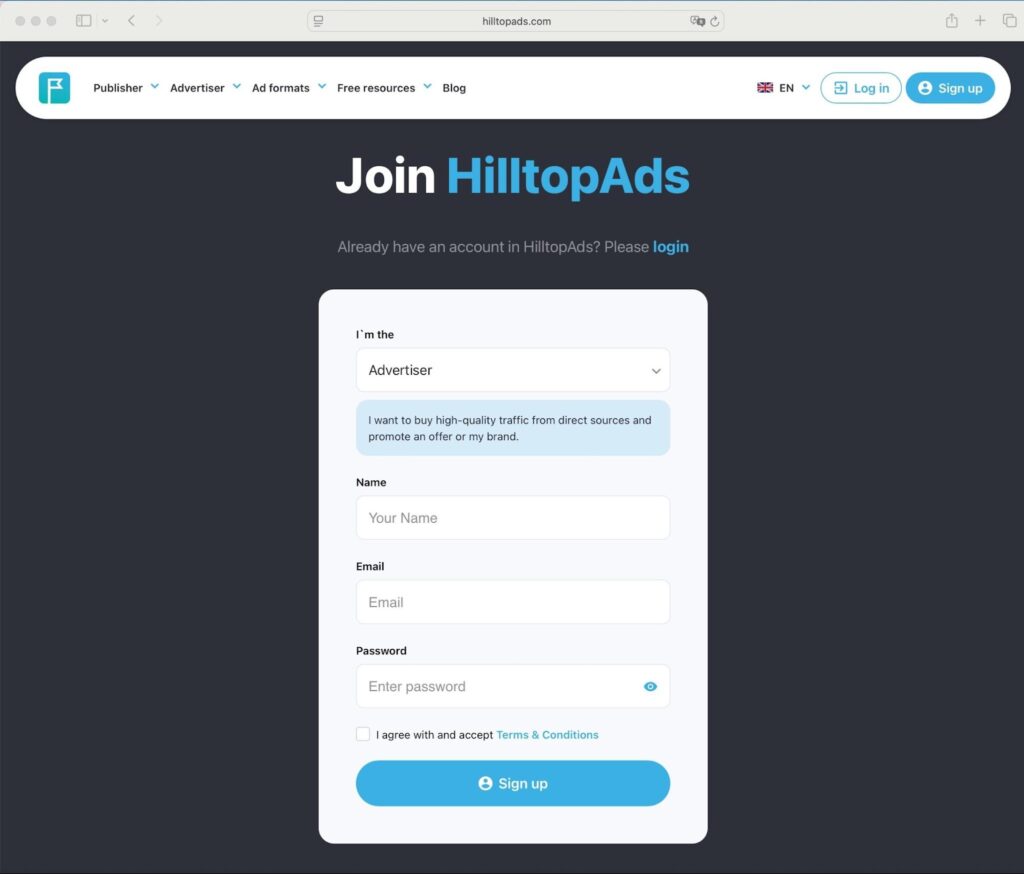
2. Check your inbox and click the link in the verification email to activate your account.
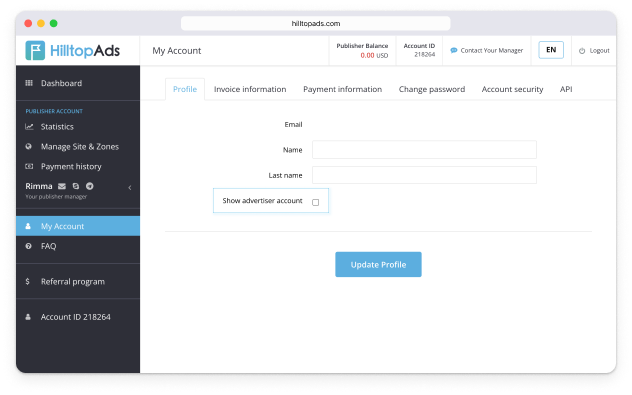
3. In case you already have a publisher’s account on the platform, you don’t need to create another one. Go to ‘My Account’ and check the ‘Show advertiser account’ box, then update your profile to unlock your advertiser dashboard.
Ready to promote your Telegram channel or bot? Start by following the steps in this guide.
Register with HilltopAds and launch your first campaign using these recommended settings.
Our advertising managers can help you choose GEOs, set up targeting, and build a testing strategy for your Telegram product.