


Track iGaming clicks, registrations, FTDs, deposits, and ROI with PeerClick + HilltopAds using advanced postback and full-funnel tracking.

Focusing only on basic optimization in iGaming usually does not lead to long-term growth.
Even if you use targeted whitelists, the main challenge is figuring out which HilltopAds zones, GEOs, creatives, devices, and browsers bring in players who actually deposit. PeerClick helps you track every step, from the first ad click to registration, FTD, repeat deposits, and payouts, so you can boost your ROI.
This guide shows you how to connect PeerClick with HilltopAds, set up tracking for useful data, and use that information to improve your iGaming campaigns and get real business results.
Register with the best ad network for advertisers HilltopAds
Why PeerClick Matters for iGaming Media Buying
iGaming campaigns usually have a delayed and multi-step funnel. A user may click an ad, visit a pre-lander, register with the operator, and deposit later. The most important event happens away from the traffic source, inside the operator’s or affiliate network’s system.
HilltopAds shows you where your traffic comes from, while the operator tracks what players do next. PeerClick brings these data streams together, giving you unified reports that connect acquisition channels to real player value.
With PeerClick, you can see which traffic sources are actually worth scaling:
- Cost per registration – how much each signup costs
- Cost per FTD – how much you pay for a depositing player
- Registration-to-FTD rate – how many signups become real depositors
- ROI by GEO – which countries bring profit
- ROI by zone – which HilltopAds placements deserve more budget
- Revenue by campaign – which campaigns return real money
- Player value by traffic segment – which combinations of GEO, zone, device, and offer perform best
This is the difference between simply buying traffic and buying traffic that actually makes a profit.
How the Tracking Flow Works
To track results accurately, you need to keep the click ID throughout the entire conversion funnel.
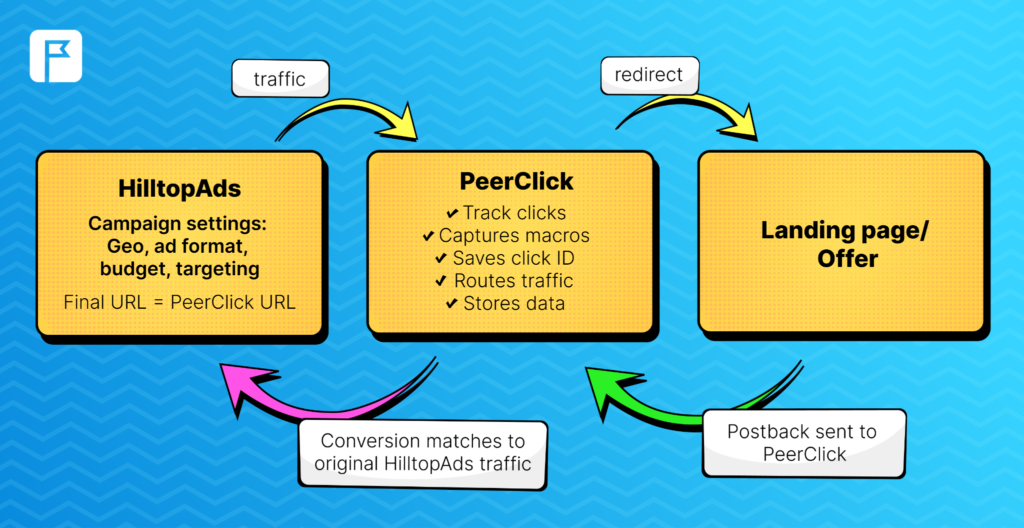
When someone clicks your ad on HilltopAds, they are first sent through a PeerClick campaign URL instead of going directly to the offer, PeerClick records the click, creates a unique click ID, captures HilltopAds parameters, and redirects the visitor to your landing page or offer.
The operator or affiliate network receives this click ID and stores it with the player. Later, when the player registers, makes a first deposit, or completes another paid action, the operator sends a server-to-server postback to PeerClick.
After that, PeerClick matches each conversion to the original click and shows you which campaign, zone, GEO, ad, device, browser, or landing page led to that result.
In practice, S2S postback tracking is still the most reliable way to track conversions in iGaming. Pixel tracking can capture on-site events, but important actions like FTDs and deposits happen inside the operator’s system and need postback integration for accurate tracking.
Launch your advertising campaign now
and maximize your ROI.
Step-by-Step Setup: PeerClick with HilltopAds
Step 1: Add HilltopAds as a Traffic Channel
Log in to PeerClick and open Traffic Channels.
Create a new traffic channel and select HilltopAds from the template list. PeerClick already supports HilltopAds, so the main tracking parameters can be added automatically. Remember to add your HilltopAds Advertiser ID (simply change it in the default link).
HilltopAds can pass useful macros into PeerClick, including:
✅ {{geo}} – country
✅ {{adid}} – ad ID
✅ {{zoneid}} – zone ID
✅ {{campaignid}} – HilltopAds campaign ID
✅ {{lang}} – visitor language
✅ {{category}} – traffic category
✅ {{cpmbid}} – CPM bid
✅ {{price}} – click or impression price
✅ {{browsername}} – browser name
These values are important for optimization. In many iGaming campaigns, profit or loss often depends on the ad zones, GEO, browser, or device – not just the campaign as a whole.
Step 2: Create the iGaming Offer
Go to the Offers tab in PeerClick and create a new offer.
Paste the offer URL from your operator, affiliate network, or iGaming partner. Then make sure the PeerClick click ID is added to the offer URL using the parameter accepted by the operator.
Example: https://casino-offer.com/?subid={clickid}
The parameter can have different names: subid, click_id, cid, s2, or something else depending on the operator. The exact name is not that important as the process: the operator receives the PeerClick click ID and sends it back later in the postback.
If the operator doesn’t store the click ID, you will not be able to match registrations and deposits back to the original HilltopAds click.
Step 3: Separate Registrations, FTDs, and Deposits
If you treat all conversions the same, you miss the real economics of iGaming acquisition. A registration and a first-time deposit are very different events with different impacts on your business.
A basic tracking setup should separate:
✅ Registration – the user created an account
✅ FTD – the user made the first deposit
✅ Deposit – the user made a repeat deposit
✅ Revenue or payout – the value of the conversion
If the operator supports event type parameters, include them in the postback.
Event type examples:
status=registration
status=ftd
status=depositHence, the postback may look this way: https://your-tracking-domain.com/postback?cid={clickid}&payout={payout}&txid={transaction_id}&status=ftd
The exact tokens depend on the operator or affiliate network. Always check their documentation or ask your account manager which macros they support.
If event types are not supported, use separate postback URLs for each event.
Registration postback: https://your-tracking-domain.com/postback?cid={clickid}&status=registration
FTD postback: https://your-tracking-domain.com/postback?cid={clickid}&payout={payout}&txid={transaction_id}&status=ftd
Repeat deposit postback: https://your-tracking-domain.com/postback?cid={clickid}&payout={payout}&txid={transaction_id}&status=deposit
Including a transaction ID parameter (txid) enables tracking of repeat deposits for each player, which helps you analyze lifetime value more accurately.
Step 4: Add a Pre-Lander if Your Funnel Uses One
Many iGaming funnels don’t send users directly to the operator. They use a bonus page, a casino review, a comparison page, a quiz, a Telegram flow, or another pre-lander.
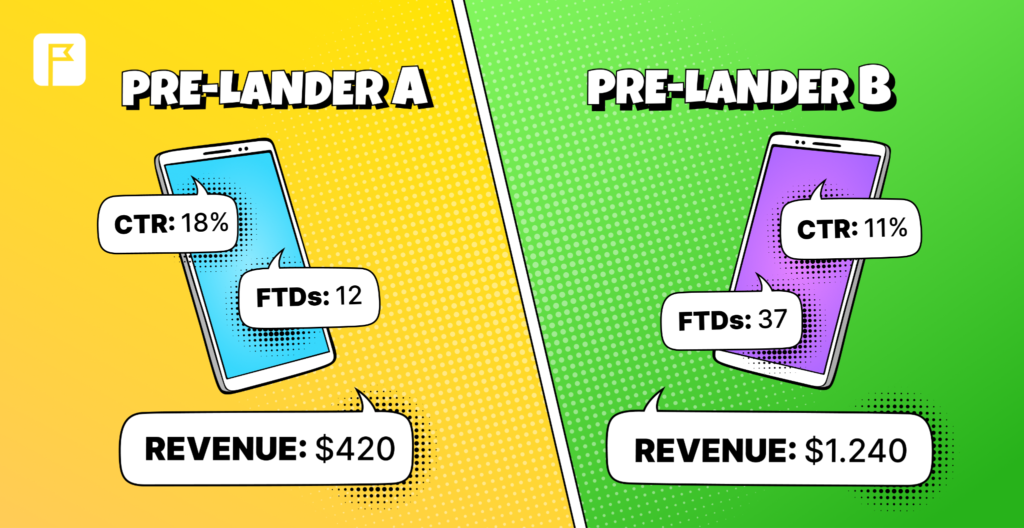
When a pre-lander is part of the funnel, integrating it into PeerClick’s campaign path allows you to distinguish between pages that drive engagement and those that contribute to actual deposit conversions.
For example, you can compare:
✅ which pre-lander sends more users to the offer;
✅ which pre-lander generates better registration quality;
✅ which pre-lander brings more FTDs;
✅ which GEO or device performs best with each page;
✅ which page creates revenue, not just engagement.
This is important because the landing page with the highest CTR is not always the one that brings the most profit.
Step 5: Build the Campaign in PeerClick
Open Campaigns in PeerClick and create a new campaign.
Select HilltopAds as the traffic source. Add your offer, pre-lander, or full campaign flow. Save the campaign and copy the generated PeerClick campaign URL.
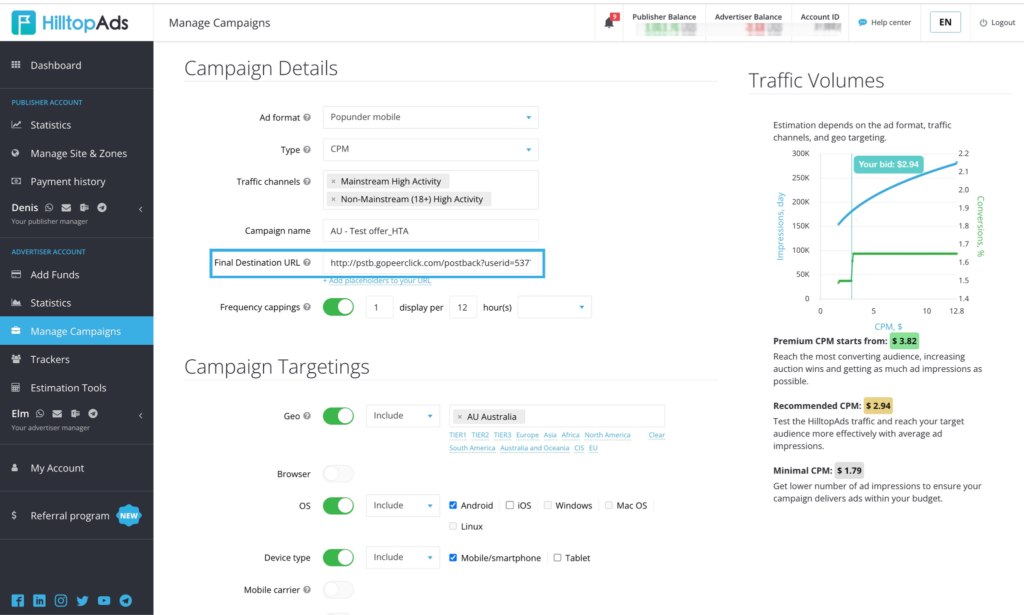
This URL is the final destination URL you will use on HilltopAds.
Step 6: Use the PeerClick URL in HilltopAds
Log in to HilltopAds and create or edit a campaign.
Choose the ad format, targeting, pricing model, campaign limits, and budget. Use the PeerClick campaign URL into the Final Destination URL field.
From this point, the process looks this way: HilltopAds traffic will first pass through PeerClick, and PeerClick will record clicks, capture macros, route visitors to the right place, and later match postback conversions to the original traffic data.
Step 7: Test the Flow Before Launch
To avoid further issues, we highly recommend ensuring that everything works smoothly before sending paid traffic.
Open the campaign URL and check that the redirect works correctly. Confirm that the click appears in PeerClick. Make sure HilltopAds parameters are captured. Then fire a test conversion or ask your operator/account manager to send a test postback.
Check-list:
✅ the click appears in PeerClick;
✅ HilltopAds macros are captured correctly;
✅ the click ID reaches the offer;
✅ the postback returns the same click ID;
✅ the conversion appears in the correct campaign;
✅ the event type is correct;
✅ payout and transaction ID are passed properly.
If tracking is broken, a good campaign can look bad and a bad campaign can look good. Testing helps you prevent both issues.
Сommon Problems PeerClick Helps Solve in HilltopAds Campaigns
Too Many Registrations, Not Enough FTDs
A frequent challenge in iGaming is campaigns that deliver high registration volumes but fail to convert those users into depositors. Without this conversion, acquisition costs are unlikely to be recovered.
PeerClick helps you compare registrations against FTDs, deposits, cost, and revenue. If a specific HilltopAds zone produces many signups but no depositors, it may be bonus hunters, or the wrong audience for the offer.
Plus, make sure the platform itself works well. Check for issues with payment gateways, support for common payment methods in your target GEO, page loading, bugs, and other technical problems.
Multiple Offers and Operators
Many teams test several casino or betting offers at the same time. If you put each offer in a separate campaign, comparing results can get messy.
A better way is to keep related offers in one campaign flow when the traffic source, GEO, and targeting are similar. For example, you can split traffic between three operators and compare how each performs under the same conditions.
This helps answer:
✅ Which operator gets more FTDs from the same traffic?
✅ Which offer has better revenue per click?
✅ Which casino brand works better in a specific GEO?
✅ Which offer deserves more traffic from HilltopAds?
Delayed Deposits
iGaming conversions don’t happen immediately. A user might click today, register tomorrow, and deposit a few days later – that’s absolutely normal for the niche.
However, attribution breaks down if click IDs are not maintained throughout the funnel. PeerClick helps attribute late conversions back to the original click as long as the operator stores and returns the click ID correctly.
This helps you avoid pausing traffic too early just because FTDs did not happen immediately.
Fraud, Bots, and Bonus Abuse
Not every registration is a valuable player. Some traffic can include bots, proxy users, accidental clicks, incentivized users, or bonus hunters.
The registration-to-FTD rate is one of the most important quality signals. If a zone brings in too many registrations but almost no FTDs, it usually needs a closer look.
Possible reasons:
✅ misleading creative;
✅ weak offer match;
✅ bonus abuse;
✅ broken registration-to-deposit flow.
In PeerClick, you can analyze this by zone, GEO, device, browser, campaign, ad ID, and other HilltopAds parameters.
Telegram, Mini Apps, and Non-Standard Flows
Some iGaming funnels use Telegram bots, Mini Apps, messenger flows, or other intermediate steps before sending users to the operator.
The rule stays the same: the PeerClick click ID must be generated and preserved before the user reaches the operator.
If the user goes through a bot or Mini App, ensure the PeerClick campaign URL is used at the start of the flow, or that the click IDis maintained throughout. If the click ID is lost, S2S attribution breaks.
🎁 1 Month Free for HilltopAds Users
No tracker? No visibility. Use promo code HILLTOPADS1M and get 1 month of PeerClick FREE.
Test. Track. Scale. With PeerClick. 🚀
Compliance and Data Safety
Tracking should help you optimize campaigns without exposing personal player data.
Use PeerClick for campaign data including clicks, costs, GEOs, devices, browsers, zones, event types, transaction IDs, payouts, and ROI. Don’t pass personal information through tracking URLs.
Here is what we recommend to keep in mind:
✅ Use S2S postbacks for registrations, FTDs, and deposits whenever possible.
✅ Do not pass names, emails, phone numbers, documents, or other personal data in tracking links.
✅ Keep parameters technical: click ID, zone ID, campaign ID, GEO, device, browser, event type, payout, transaction ID.
✅ Learn the gambling advertising rules in each GEO you target and do not breach the codes.
✅ Pay attention to the gambling disclaimers, age restrictions, and clear bonus terms where required.
✅ Keep your privacy policy updated and explain what tracking data is collected and why.
S2S tracking is especially useful in iGaming because it doesn’t rely on browser cookies like pixel tracking does. Since the most important events happen on the operator’s platform, postbacks are usually the most reliable way to connect deposits to HilltopAds traffic.
Final Thoughts
A strong PeerClick + HilltopAds setup comes down to one main idea: keep the click ID alive through the whole funnel and send every important event back to the tracker.
🎁 Exclusive Bonus for New Advertisers: Get a +20% bonus on your first deposit starting from $200. Simply register using the promo code IGAMINGHT to activate the offer and increase your advertising budget from day one.
Start by adding HilltopAds as a traffic channel in PeerClick. Then create your offer, pass the click ID to the operator, configure postbacks for registration, FTD, and deposit events, build the campaign, and use the generated PeerClick URL in HilltopAds.
Once your campaign is live, don’t judge results just by clicks and registrations. With deeper analysis only you can get operational insights and optimize campaigns effectively. Track cost per FTD, registration-to-FTD rate, ROI by zone, revenue by GEO, and player value by traffic segment.
When set up correctly, PeerClick gives you the data foundation you need to scale HilltopAds iGaming campaigns with confidence. Tracking systems were built to solve real problems and give you visibility to make right optimization decisions.

Register with HilltopAds and get:
- Advanced targeting options
- Direct traffic sources
- Self-serve platform
- Fully-managed service
- Postback tracking