


Video campaigns burn budgets in seconds when the hook misses and targeting falls apart. This guide shows how to launch and scale video ads in HilltopAds with sharp creatives, clean setup, and conversion-focused optimization. Inside, you’ll get the exact steps to turn views into consistent, profitable traffic.

Video gives advertisers only a few seconds to make the point clearly. If the first few seconds do not make the offer clear, the user is likely to move on. And when the setup is weak, the budget starts slipping away before the campaign has had a fair chance to perform. That is exactly why video can be such a strong format in HilltopAds: advertisers get the tools and campaign structure they need to run video as a real performance channel, not just another media slot to fill. Video campaigns can run on desktop and mobile, use both CPM and CPC buying models, and benefit from targeting, postback tracking, and optimization tools that make video scalable from an acquisition standpoint, not just a branding one.
The real question is not whether to run video at all. It is whether to launch it with the right traffic channel, the right creative logic, and the discipline to optimize around what actually converts. That is where most video campaigns either work or fall apart.

Launch your campaign with HilltopAds
and get access to 273+ billion impressions per month across 250+ countries.
Who Video Advertising in HilltopAds Is Best For
Video tends to perform best in offer categories where the value can be understood instantly on screen. Dating, games, mobile apps, iGaming, eCommerce, and streaming offers are all strong examples, while highly specialized offers usually make a weaker fit. Put simply, video performs best when users can grasp the offer immediately from what they see, instead of needing a long explanation or a more niche decision-making process.
Some offers are simply easier to show than to describe. Video works well for those. If a user can see the gameplay, the bonus mechanic, the vibe of a dating app, a cam teaser, or what an app actually does in the first few seconds, the message lands much faster than it would in a static ad. The same is especially true in iGaming, where video placements can build more trust when they show real gameplay instead of asking users to imagine it from a banner alone.
When it comes to launch priorities, some verticals naturally translate better into video than other

Helena
Senior Sales Manager HilltopAds
The strongest verticals to start with are iGaming, non-mainstream offers such as dating and cams, and games.
That lines up well with broader recommendations for dating, gaming, and iGaming offers. It is also important to route 18+ offers through non-mainstream traffic. If the offer is aimed at a non-mainstream audience, the traffic channel is not a minor setting – it is part of the launch logic itself.
So when does video make the most sense? Use it when the creative can do meaningful work before the click: show the product, build trust quickly, or create immediate interest. If the offer is highly specialized, text-heavy, or difficult to understand within a few seconds, video is usually not the best format to test first.
Check out our case study on how to launch a successful non-mainstream campaign for a French audience:

What Video Ad Formats Are Available in HilltopAds
For advertisers on HilltopAds, the core video format is Video VAST – a video ad shown in a video player, available in three placement types: pre-roll, mid-roll, and post-roll. VPAID is supported as well, and video campaigns can run on both desktop and mobile with either CPM or CPC pricing.
There are two main ways to run the format. You can upload a video creative and connect it to a click-through URL, or use a VPAID URL or another tag-based setup when delivery depends on a VPAID or VAST integration. If the setup is code-based, it makes sense to run it through the built-in VAST/VPAID tester first. It supports both tag feeds and custom XML, which makes it the easiest way to catch issues before the campaign goes live.
The distinction is still worth understanding. VAST is the standard format for serving video ads in players. VPAID was built for more interactive in-stream experiences. VPAID is still usable, but it is no longer the obvious default. Most setups are better off starting with VAST and using VPAID only when there is a real reason, and the setup has already been tested.
If the goal is to keep things simple, start with VAST and test VPAID only when there is a clear technical or creative reason to do so.
Technical Requirements for Video Creatives
Before launching a video campaign, check that the creative meets the platform requirements.
- Accepted formats:
– mp4
– webm
– ogv
– flv - Allowed size:
– Minimum: 360×240
– Maximum: 1024×768 - Maximum file size: 40 MB
- What to check before upload: One of our key insights when working with clients is that creative problems are often confused for traffic problems, particularly after the campaign starts falling off. And that is the reason it is useful to verify everything one last time before upload: ensure a proper render of the file, check that all files are adjusted to the aspect ratio of your target device, confirm that the landing page opens correctly and test the clickthrough taking exactly where you say in the ad.
- Validate tag-based and VPAID setups: If you are using a tag-based or VPAID setup, validate it in the VAST/VPAID tester first. The tester lets you load a feed or custom XML and catch playback errors before the campaign is live, which is far cheaper than discovering them after spend has started.

Sign up on HilltopAds and get:
- Advanced targeting options
- Direct traffic sources
- Self-serve platform
- Fully-managed service
- Postback tracking
What to Prepare Before Launching a Video Campaign
A lot of the real work happens before the campaign is even live. By the time you click Add Campaign, you should already know what offer you are pushing, where the traffic is going, how you want to split GEOs and devices, and how conversions will be tracked.
Set the campaign structure first
Try not to overload one campaign with too many variables. If GEOs behave differently, separate them early. It is much easier to read the performance that way. The same applies to devices: campaigns are built for either desktop or mobile, so the split needs to be clear from the start.
Make sure tracking is ready
Tracking is not something to patch in later. Postback is what tells you whether the campaign is actually working. It lets you capture conversions, judge cost feasibility, and pass useful parameters such as GEO, campaign ID, conversion cost, and user language. HilltopAds works with trackers such as Voluum, BeMob, Keitaro, RedTrack, Adjust, and AppsFlyer, and conversion tracking can be tested in the Trackers section. If you want to optimize by conversion rate, conversion count, or eCPA, going live without postback means flying blind.
Check the setup before launch
Before launch, the setup also needs to be technically clean.
Helena
Senior Sales Manager HilltopAds
For VPAID campaigns, it’s important to check that the link works correctly before launch.
That recommendation matters for VPAID and any code-based delivery setup. Delivery issues are much easier to fix before the campaign goes live than after spend has already started.
Prepare enough creatives for testing
The same rule applies to creative preparation for VAST.
Helena
Senior Sales Manager HilltopAds
When launching a VAST campaign, add as many video creatives as possible.
HilltopAds supports up to 10 video creatives in one campaign. If testing matters, creative volume matters too.
Keep video length practical
Video length is another place where discipline matters.
Helena
Senior Sales Manager HilltopAds
Don’t use long video ads – 10 to 15 seconds is the sweet spot.
At launch, the creative’s job is not to tell the whole story. Its job is to make the offer instantly understandable and easy to process, especially on mobile.
Do not overlook branding
Helena
Senior Sales Manager HilltopAds
If the advertiser is promoting their own product, use a logo for better brand recognition.
If the advertiser is promoting its own product, branding should be visible from the start. Even a simple logo can help with recognition and make repeat exposure feel more familiar.
Match the creative to the targeting
If the campaign is targeted by language, the creative should be in that same language too. It is a small detail, but mismatches like this can weaken a campaign faster than people expect.
We also recommend checking out our guide on how to launch profitable eCommerce campaigns:
How to Launch a Video Campaign in HilltopAds
The launch flow itself is simple.
Start in the dashboard
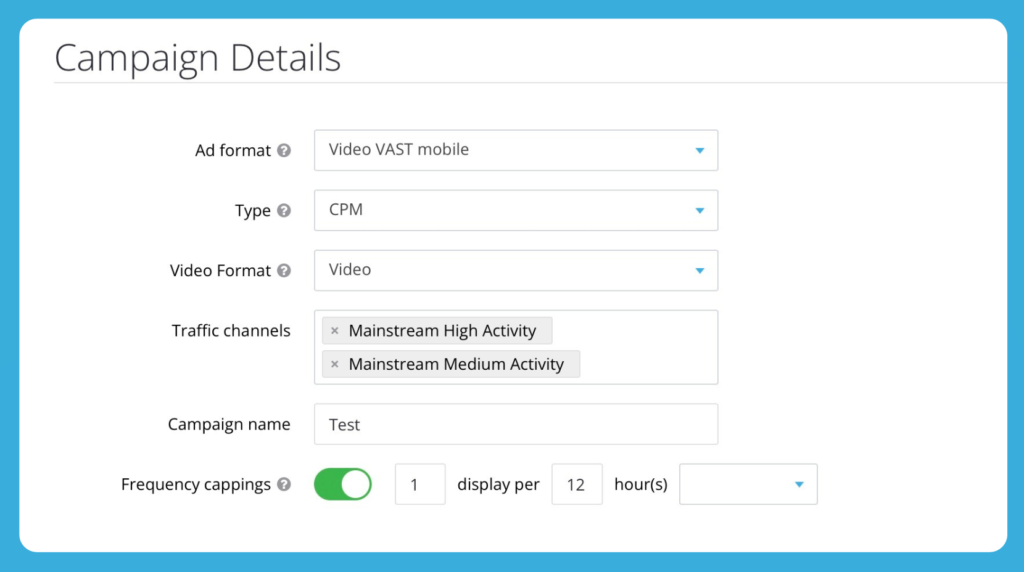
From the dashboard, go to Manage Campaigns, click Add Campaign, and choose the video VAST format for either desktop or mobile.
Choose the pricing model
After that, choose the pricing model.
Available pricing models:
- CPM – paying per 1,000 impressions
- CPC – paying per click
The right model depends on whether the setup is designed to buy reach efficiently or make the click the first hard filter.
Select the video format
In the Campaign Details section, choose the Video Format you want to work with. Depending on the setup, this can be either:
- Video – if you are uploading a video creative directly;
- VPAID URL – if the campaign relies on a code-based VPAID setup.
This choice defines how the campaign will be delivered and the creative setup needed.
Set the core campaign details
Next, fill in the basic campaign settings: choose the traffic channel, add the campaign name, set frequency capping, and complete the remaining fields, including targeting, destination URL, limits, and schedule.
Choose the traffic channel based on the offer type. Non-mainstream offers should run on non-mainstream traffic. Offers without age restrictions should run on mainstream traffic. For the first test, High Activity traffic is usually a better starting point. It helps collect results that are easier to evaluate before testing cheaper or broader traffic sources.
Upload the creative and fill in the destination URL
At the creative upload stage, add the video file, name the creative, set the skip time, and enter the Final destination URL.
- If the skip field is left empty, the skip button will appear after 15 seconds.
- If you enter 0, users will not be able to skip the video.
For short creatives, this setting is especially important. With a 10-15 second video, the offer should be clear before the skip button affects user behavior. The Final destination URL field also supports tracking placeholders, so you can pass the data you need for later analysis.
Choose targeting carefully
In HilltopAds, you can target video campaigns by GEO, browser, OS and OS version, device type, carrier, connection type, language, app, city, IP range, and ISP. Some extra options, including US states, keywords, and interests, are available through the manager.
For the first launch, keep the targeting simple. Start with the settings that matter most for the offer: GEO, device, traffic channel, and language. If you add too many filters at once, it becomes harder to understand what affected the result. A clear setup will show faster whether the issue is in the creative, audience, traffic source, or offer itself.
Double-check everything before launch
Before going live, make sure the creative renders correctly, the landing page loads properly, and the click-through leads exactly where the ad promises. If the setup involves VPAID or any other code-based delivery method, validate it in the VAST/VPAID tester before launch.
Launch the campaign
Once the setup is ready and everything has been checked, click Add Campaign and start reading performance at the creative level from day one.
Register with the best ad network for advertisers HilltopAds
How to Work With Video Creatives So They Convert
A video creative has to get to the point fast. If a user still does not understand the offer after the opening seconds, the ad is already losing them. That is why shorter videos are usually the better place to start. It is not that longer storytelling can never work – it can – but early-stage acquisition campaigns need speed.
The message has to land quickly, the video has to play cleanly, and the creative has to hold up on mobile without adding friction. Not every winning creative will sit in the 10-15 second range, but that is usually the smartest place to begin.
The second rule is variation. Running several video creatives helps you see which version works best. It does not mean putting up ten fledgling ideas and hoping that one of them does a miracle for you. It is far better to broadly test a number of variations around one angle: the same offer, the same core promise, the same LP-logic – but different opening frames, pacing, hooks, CTA phrasing, or proof elements. This simplifies creative-level optimization later on, making it easier to read.
For iGaming and gaming offers, show the thing people actually care about. Video placements can build trust by showing real gameplay instead of relying on static claims. The same principle works well beyond casino: use motion to demonstrate product experience, not just to decorate the offer. If the user still has to imagine the value, the creative is not doing enough.
If the advertiser is promoting its own product, use the logo.
Helena
Senior Sales Manager HilltopAds
If the advertiser is promoting their own product, use a logo for better brand recognition.
In branding terms, that increases recognition. In performance terms, it gives repeat exposure a memory anchor, which can make the click feel less like a cold decision and more like a familiar one.
Check out our case studies on how advertisers launched successful campaigns with HilltopAds and multiplied their return on investment:


How to Optimize a Video Campaign After Launch
Once the campaign is live, the rule is simple: watch the data that actually describes performance. That means impressions, clicks, conversions, and eCPA, then breaking performance down by GEO, device, traffic channel, ad zone, OS, and other parameters in the statistics dashboard. For video, this matters even more. If the only thing being watched is top-line CTR, the real signal is easy to miss.
Optimization should start at the creative level.
Helena
Senior Sales Manager HilltopAds
Check CR by ad creative, focus traffic on the better-converting creatives, and stop the ones that do not convert.
That is the core discipline. Instead of treating the campaign as one big object, compare performance creative by creative and shift traffic toward the ads that are actually driving results.
From there, use creative-level data to adjust GEO, device, traffic channel, and ad zone settings. First, check which creatives bring conversions. Then look at where they perform better: on which GEOs, devices, and traffic channels. After that, review ad zones and keep the placements that bring results. This makes optimization more precise, because you are not judging the whole campaign by one average number.
A good working rhythm looks like this:
- Check which video creatives bring clicks and conversions, not clicks alone.
- Compare how these creatives perform across GEO, device, and traffic channel.
- Review zone-level performance and see where the conversions come from.
If a few zones bring most of the results, move them into a whitelist campaign. Zones that spend without conversions should be blacklisted or limited through optimization tools. This makes optimization easier to manage because you work with specific placements instead of campaign averages.
Scale only after you see a working setup. Increase bids and budgets gradually, test new GEOs or formats step by step, and keep adding new creatives even after the first successful results. Scaling too early often increases the same problems that were already present in the test.
Launch your advertising campaign with HilltopAds and maximize your ROI.
Common Mistakes in Video Campaign Setup
A few mistakes show up more often than the rest:
- Launching a VPAID setup without validating the link, tag, or XML first, even though the tester exists specifically for that purpose.
- Starting a VAST campaign with too few creative options, which weakens optimization from the very first hour.
- Treating video like a long-form brand film when short, focused creatives are usually more effective at launch.
- Sending non-mainstream offers into mainstream traffic instead of non-mainstream traffic.
- Launching without postback and then trying to judge profitability without reliable conversion data.
- Optimizing by impressions or clicks alone instead of reading conversions, eCPA, and segment-level performance.
- Targeting by language while running creatives in a different language from the audience selected.
Final Takeaway
Video in HilltopAds is not difficult because the format itself is complicated. It is difficult because the format punishes weak setup quickly. The winning pattern is much simpler than people often make it: choose video for offers that benefit from being shown visually, default to VAST unless VPAID is genuinely needed, keep the creative short, launch multiple variations, set up postback before spending real money, and optimize hard at the creative and segment level. That is what turns video from a test into a performance channel.
If your offer needs to be shown, not just described, start with a clean VAST setup, build a tight pack of 10-15 second creatives, and evaluate performance at the creative level from day one. And if the setup involves VPAID or a more niche traffic mix, bring your HilltopAds manager into the launch before the first dollar is spent, not after the first budget is gone.